
What the app does, round after round
Credit repair companies charge a monthly fee for a job with a lot of moving parts. Credit Repair Automate runs every one of those parts in a single app:
- Pulls all three credit reportsYour TransUnion, Experian and Equifax reports come in through a credit monitoring membership you set up from inside the app, and they refresh every 5 days.
- Reads every lineEvery account, inquiry, public record, name, address and employer on all three reports.
- Finds what to disputeBureaus that report the same account differently, items past the legal reporting limit, deleted accounts that came back, and personal details that aren't yours. Each flagged item comes with a plain-English reason, and you can uncheck anything you know is accurate.
- Picks the letter type for each itemA dispute to the bureau under section 611, a direct dispute to the lender under section 623, a method-of-verification request, a goodwill letter or a pay-for-delete offer, chosen from that item's own history.
- Signs every letter with your own signatureDraw or type your signature once, and the app adds that signature to every letter.
- Mails the letters, or hands them to youChoose one-click certified print-and-mail with tracking, with the cost shown before you confirm. Or download the signed letters and print and mail them yourself.
- Keeps the 30-day clockThe bureau has about 30 days to investigate. The app tracks every deadline, shows which bureau missed one, and drafts a CFPB complaint when a bureau won't do its job.
- Reads your next report and gets the next round readyThe app compares the new report with the last one, shows what was deleted, corrected or left unchanged, and switches tactics where a bureau said no, over up to six rounds.
Want the whole path from signup to letters in the mail? Read the step-by-step walkthrough. Curious how the dispute for each item gets chosen? See how the AI picks each dispute.
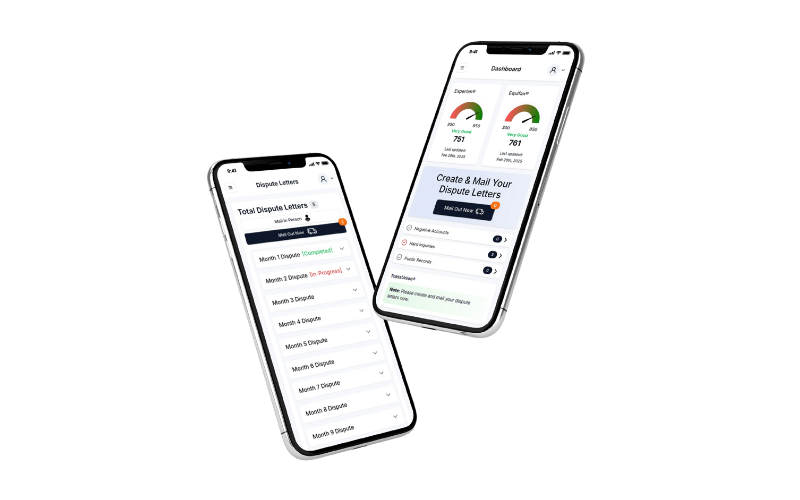
On your phone, with nothing to install
Credit Repair Automate opens in Safari, Chrome or any other web browser, on an iPhone, an Android phone or a computer. There is no App Store or Google Play download. You sign in, and your reports, letters and rounds are on whichever device you pick up.
A phone also makes the setup easier. The ID copy and proof of address that the bureaus ask for can be photos you take with the same phone.
A self credit repair app, not a credit repair company
Credit Repair Automate is a do-it-yourself tool. You are the one disputing, the way the Fair Credit Reporting Act lets every consumer do. You see every letter, and nothing goes out until you approve it.
The dispute law is what makes the work count. Once a bureau receives your dispute, the bureau must investigate, usually within 30 days, and correct or delete anything that can't be verified. No app can remove accurate, verifiable information, and the app never promises a score. How much changes depends on what is actually in your file.
What the app costs
Credit Repair Automate charges no software fee. The app needs your 3-bureau reports, and those come from SmartCredit®, a separate credit monitoring membership: $1.99 for a 7-day trial, then $29.95/mo until you cancel. SmartCredit® enrollment begins after you create your Credit Repair Automate account, on SmartCredit®'s own page. Your Credit Repair Automate account and your SmartCredit® membership each cancel on their own.
Certified print-and-mail is optional: a few dollars per letter, shown before you confirm. For comparison, a credit repair company charges $99 to $149 a month for the same job, often plus a setup fee. Every line is on the full price breakdown.
Comparing apps before you choose?
Several dispute apps look alike on their homepages. The real differences are the monthly cost, how many bureaus each app disputes with, who mails the letters and what happens in round two. See eight credit repair apps compared side by side, with every fact linked to each company's own site.
Ready to run your first round from your phone? Create your account, then connect your reports from inside the app.
Frequently asked questions
Is there a credit repair app for iPhone and Android?
Credit Repair Automate runs in the web browser on any iPhone or Android phone, so there is nothing to download from the App Store or Google Play. Sign in at app.creditrepairautomate.com and your reports, letters and dispute rounds are there, on your phone or on your computer.
Can I repair my own credit with an app?
Yes. Disputing inaccurate information on your own credit reports is a right every consumer has under the Fair Credit Reporting Act. A self credit repair app does the paperwork: Credit Repair Automate reads the reports, finds what can be disputed and writes each letter, and you decide what gets sent. The bureau must investigate, usually within 30 days, and correct or delete what can't be verified. Accurate, verifiable items stay, and no app can promise a score.
How is a credit repair app different from a credit repair company?
A credit repair company runs the disputes for you, usually for $99 to $149 a month, often plus a setup fee. With Credit Repair Automate you run the same process yourself and see every letter before it goes out. Credit Repair Automate charges no software fee. Your 3-bureau reports come from SmartCredit®, a separate credit monitoring membership: $1.99 for a 7-day trial, then $29.95/mo until you cancel.
Does the app mail my dispute letters?
Only if you choose to. For each round, pick one-click certified print-and-mail with tracking, with the cost per letter shown before you confirm, or download the signed letters and print and mail them yourself.
What do I need to get started?
Your name, email, current address, date of birth and the last four digits of your Social Security number, because every dispute letter needs them to identify your file. You also add a photo of your ID and a proof of address, which you can take with your phone's camera, and you set up your 3-bureau reports from inside the app. The signup walkthrough shows each step.